

As things in the world escalate faster and faster, it grows harder and harder to write a newsletter. By the time you finish a complete thought, the landscape has shifted. I’m unsure how we’ll address that, but it weighs on me every time we sit down to launch a new HYPER. For marketing leaders, trying to understand all the new algorithms changes, apps and workflows that launch seemingly daily now and then to be able to actually have a recommendation to roll out to your team seems…impossible. It’s no wonder so many brands have paralysis of action in the modern marketing landscape.
I’ve taken to spending about three nights a week, starting at about 9:30, just trying a new thing. What new AI tool or bookmarked workflow can I just give a shot to at the end of the night?
My first very successful experiment with this is using AI to edit videos. This week, I’ve started editing my videos with ChatGPT Astra, and it works extremely well. At the end of this newsletter, I break down a full cheat sheet on how to do this.
At the same time, there’s heavier, more macro movements in culture that are settling in from changes in consumer the last few years. I have a longform conversation with Ana Andjelic going through this in my latest Youtube.
Let’s begin.
Editing via Chat
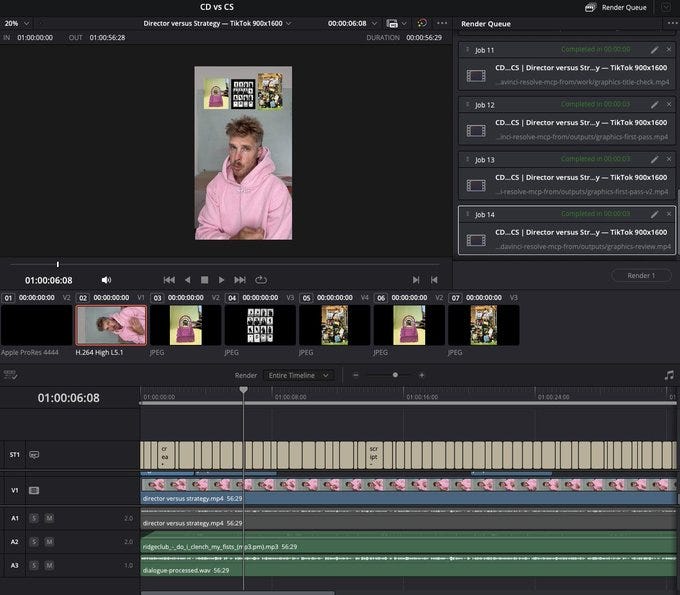
I am editing videos in Codex, it is amazing and a little scary, but a massive time saver. For several of my styles of content, and for casual brand work and UGC, the gate more than ever is purely the idea, ChatGPT can handle the rest.
Yesterday I did an unboxing video, and since I’d setup a system prior, this was the extent of what it took to edit it, this chat parameter. It has hundreds of thousands of views on TikTok and X.
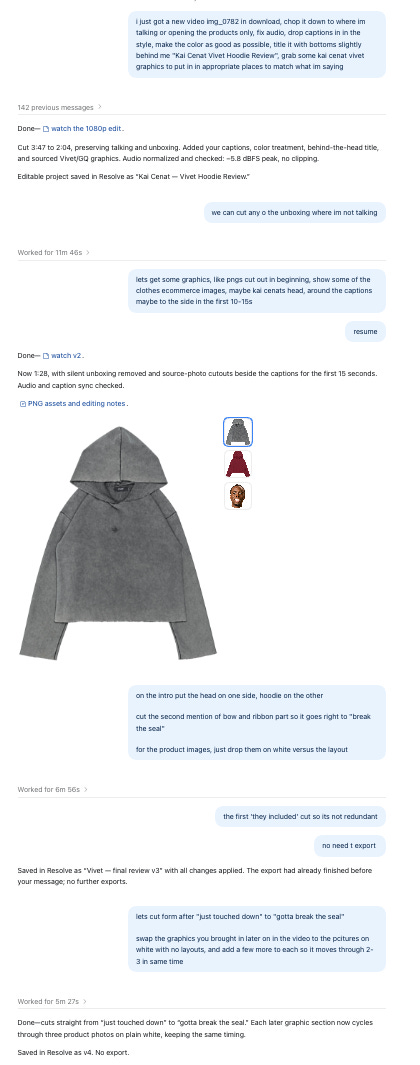
Full tutorial here:
Getting Started
I am doing this in the Codex section of ChatGPT Work on the desktop app on my computer, using the GPT-6 Astra Light model. I’ve found light is just as good as high for this and uses less of your plan.
I am using Davinci Resolve (Studio version) because its a great editor and has the MCP. Adobe Premier and Capcut also have MCPs but have not used them, I imagine the process is similar.
Levels of Vibe Editing
There are three levels of editing that you should consider that you can use ChatGPT for:
What I’ll call basic editing, which I think anyone should do. This can automatically do your cut downs, your punch-ins, your audio fixes, your captions, and your color for talking head videos, and then you can work on your edit from there.
A skill-based edit where you’ve given it some of your video references, and you build a toolkit of what your content looks like and what your images typically look like. You feed it a prepared script instead of images for your video and have it conduct the initial edit, and then you can tweak from there. By doing this, you can take most of your edits to 80% with some prep work and save a lot of time.
What we’ll call a vibe edit, where you start with the first two, but then you make all your actual edits in chat versus using the software. This is what I did for the example video. I started with the basic edit, had it then add a bunch of things I’d already prepped using a skill for my videos, and I asked for all the changes and optimizations in chat.
The difference is basically how much you want done for you. You can get an excellent cut on a pretty simple video using one or two without having to do any additional work. It will quite literally edit all of it for you if you’ve done some decent prep.
If you want an excellent video, you still want to look for something great, like the style of my content. You’re going to need some back and forth, and it’s just a matter of whether you want to do that in the video editor or just do it in chat. I love to do a lot of work via voice, so being able to watch a video and just say the things I want to change into Codex (and then have it go to work in the background) is an excellent time saver.
Connecting Codex and your MCP
Prompt:
Install the DaVinci Resolve MCP from github.com/samuelgursky/davinci-resolve-mcp, set it up for my version of Resolve, and test the connection. There might be a newer mcp direct from blackmagic, check there.
Basic Edit
This is the most useful for most people, and cuts down pre-production if you edit a lot. This will do your entire initial cutdown. Before you copy and paste,
identify the folder location for footage
Choose a captions font (montserrat is very close to the default tiktok font)
get a screenshot reference to include
Execute on these in order
Size: Adjust the project to 900x1600 size for tiktok
Files: bring in my recordings from (folder location)
Cutdown: Cut the clip down to remove all silences, anytime I do multiple takes use the last of the takes and remove the others, have no space between takes more than what a natural voice would be, seamlessly go into the next phrase
Audio: Take a first pass at the audio mix on the voice so it sounds professional keep dialogue easy to hear, use these as starting targets for measured playback peaks: voice around -12 to -6 dBFS, music under voice around -30 dBFS, and sound effects around -25 dBFS. Adjust by ear so the mix feels natural and effects don’t blast over the voice. Play through the timeline and actually inspect the audio meters for the voice, music, effects, and final mix. Don’t assume changing a clip’s volume by a certain number of decibels means it is hitting that level. Check for clipping and abrupt audio cuts, keep the final mix below 0 dBFS
Captions: generate captions in the same style as the first video we did, 2 words or so a line, that match very closely how i speak. Use the ___ font and place just lightly below the speakers face, with a slightly shadow to make it readable. Copy the style of this screenshot (include previous caption screenshot)
Color: Take the color settings from my “______” project in Davinci and tweak this file to get a similar color grade and look and feel for all footage
Advanced Edit
If you want to really cook, prep your video
References (2 or 3 other videos in the same style)
Main timeline (you talking etc)
Supporting graphics/videos (I label and put them in a folder)
Script.
Prompt for style (paste with references)
Go frame by frame through the reference videos to create a video editing style kit we’re going to use. Not how graphics are used, padding, sizing, framing, size of titles and captions, animations, transitions, color correction, and any other visual queues.
Paste the script and put notes on where to add the videos and graphics. Any missing areas ask it to source from your browser, or describe something to generate. Ask Astra to do the basic edit, use the video editing style kit to do an initial pass, and put in all the graphics from the folder based on the script queue you use below
Review the initial pass, and simply chat your edits..
Vibe Editing: How I Made The Example
So for this video you saw, my process was
Ran the basic edit above
Ran the advanced edit based on my folder of graphics
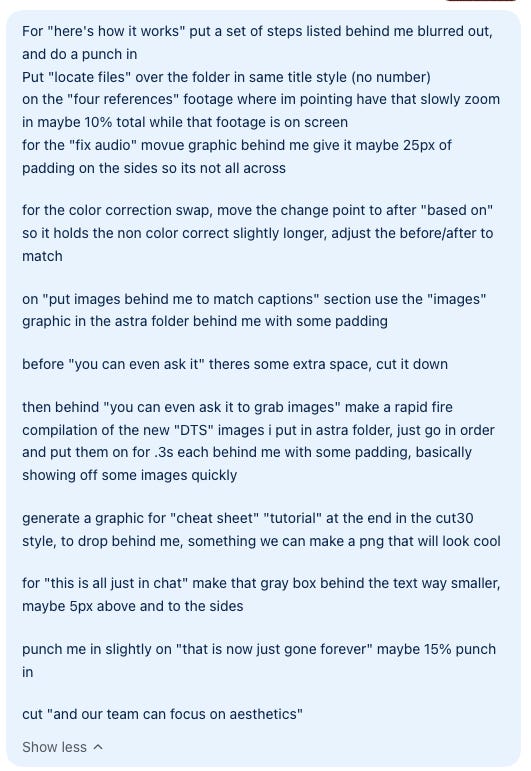
After the first pass, I asked via chat to fix everything I wanted change, I did not adjust ONE THING in Resolve directly I just asked chat.
Example of the notes I sent in chat for feedback.
The New Rules of Brand Marketing
I spoke with Ana Andjelic in-dpeth about marketing and luxury brands. One of the most interesting parts of this conversation was what happens to luxury brands when so many other brands borrow the luxury codes. A topic that she and I discussed had been what happens when Zara is using the same photographers as LVMH, the same models, the same campaign standards. At the same time, those big luxury dinners under the Grecian stars are executed by Mango the way they used to be executed by Chanel.
All of these codes have been co-opted to sell things at lower-to-middle price points. What codes does that leave for luxury brands to be able to actually attract the luxury consumer? Exclusivity in real life, being in the right places, the correct execution of resort, etc., can always cater to a particular few, but how does that consumer world not just massively contract, comparative to the scale those brands achieved over the last few years?
How can brands on any side think about positioning and activating in this scenario? We discussed this in depth in the Darkroom Villa Can Lions, and the full conversation is edited above.
Kitchen Sink
We are hiring SO MANY creative roles at Darkroom, in NYC and remote. Join us.

The next generation of hardware is upon us

Advertising alpha:


Until next week,
Oren
Want to scale your brand with us? darkroomagency.com
The next Cut30 short form bootcamp starts October 30th: https://cut30.co
"The gate is purely the idea" is the part that stayed with me. Once editing is a chat parameter, the brief becomes the product. Three nights a week trying one new thing is a better plan than most teams' AI roadmaps.
I have been so surprised at how well it has done. I had no idea it even had this capability.